Spotted a post yesterday on running OSGi on maemo. Up and running with a servlet container inside OSGi (the Eclipse Equinox implementation) on my Nokia N800.
Missing the bluetooth GPS device to try the Google GPS Mashup on OSGi
After setting up an OSGi console running over ssh to my n800, I tried directly installing bundles from remote http sites (if you've only ever used Eclipse and it's update manager you're probably not aware of the framework's ability to directly install and uninstall bundles from any http site at the console command line).
However, it's a long way from rubygems or cpan - there are a few repositories around, but no more than web sites hosting files. It's hit and miss finding a bundle that meets the java execution environment of Java CDC, or doesn't have the wrong sort of native code, and although the bundles themselves know their dependencies, there's nothing to connect those logical dependencies with their physical resolution. OSGi RFC-0112 is supposed to solve that problem.
Showing posts with label n800. Show all posts
Showing posts with label n800. Show all posts
Saturday, 12 May 2007


n800 and eclipse remote system explorer
Eclipse Target Management Project have an set of plugins called Remote System Explorer. Integrates ftp, sftp, ssh into Eclipse - they also have their own agent to run on a *nix box as an alternative (it can remotely explore tar files for example)
I've set this up now to explore my shuttle pc (winxp), remote hosting account, and just added the n800. With openssh already installed on the tablet, getting connected is straightforward.
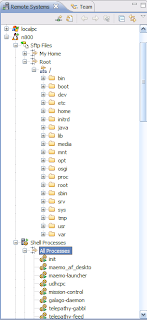 here's the recipe:
The shell has Eclipse style content assist (ctrl-space) doing the traditional bash job of the tab key, although this is pretty slow over ssh.

New in the latest builds of RSE is integration with EFS, which is like fuse.sourceforge.net">FUSE for Eclipse. You can now mount a remote file system via ssh, ftp or datastore and access it inside any Eclipse project. (Go to FusePort if you want to do this the other way round, mounting a remote file system via ssh inside maemo)
To do this, use New Folder on any Eclipse project, choose Advanced, click Link to Folder in the File System and change the File System Provider to RSE. You should now get a drop down of remote FS you've previously set up in RSE.
As you'll see from the example, the remote folder gets identified by a little shortcut decorator.
sshd on maemo seemed a little stretched by the demands, and had to be restarted several times. even over a local (everything within 2 metres) 802.11g connection, it's too slow for practical editing, although RSE does cache the directory structure to make browsing speedy.
I've set this up now to explore my shuttle pc (winxp), remote hosting account, and just added the n800. With openssh already installed on the tablet, getting connected is straightforward.
 here's the recipe:
- Make sure you're installed openssh for maemo (you'll have had to have accepted the red pill for this to install)
- Install Eclipse (I've used 3.3 M7)
- Use the Update Manager to select Remote System Explorer from the Remote Access and Device Development category under Europa Discovery Site
- Switch perspective to Remote System Explorer
- Use the new connection icon on the Remote Systems view or from the File | New wizard
- Choose Linux, add the basic connection details, and on all the subsequent pages of the wizard choose ssh over datastore
- You should now be able to click on sftp files to browse the file system, shell processes to view (and kill) processes, and ssh shells to connect in
- (default root password for maemo is rootme)
exploring
content assist
The shell has Eclipse style content assist (ctrl-space) doing the traditional bash job of the tab key, although this is pretty slow over ssh.
remote file system

New in the latest builds of RSE is integration with EFS, which is like fuse.sourceforge.net">FUSE for Eclipse. You can now mount a remote file system via ssh, ftp or datastore and access it inside any Eclipse project. (Go to FusePort if you want to do this the other way round, mounting a remote file system via ssh inside maemo)
To do this, use New Folder on any Eclipse project, choose Advanced, click Link to Folder in the File System and change the File System Provider to RSE. You should now get a drop down of remote FS you've previously set up in RSE.
As you'll see from the example, the remote folder gets identified by a little shortcut decorator.
downsides
sshd on maemo seemed a little stretched by the demands, and had to be restarted several times. even over a local (everything within 2 metres) 802.11g connection, it's too slow for practical editing, although RSE does cache the directory structure to make browsing speedy.
Subscribe to:
Posts (Atom)
